We ran this test in Korean. The emails, the studio's info sheet and the AI replies quoted below are our English translations, and amounts are in Korean won (KRW), as in the test.
Do you write similar replies from scratch every day?
On a Tuesday morning after two days off, Yunseo, who runs the one-person Danbi Photo Studio, opens the inbox. The studio and the person are made up for this post. There are three emails. One asks her to come to a company year-end party and take a group photo. One is from a customer who wants to change a booking date. One asks when the photos from last week will arrive. She got similar emails last month too. Yet every reply gets written from scratch.
Replies like these are usually one of three kinds: a decline, rescheduling, or information. So we handed these three emails to AI. The emails and prices are all made up, and no reply was actually sent. Once we tried it, the part to hand to AI and the part the owner should write herself separated quite clearly.
What changes when the same email is handed over two ways?
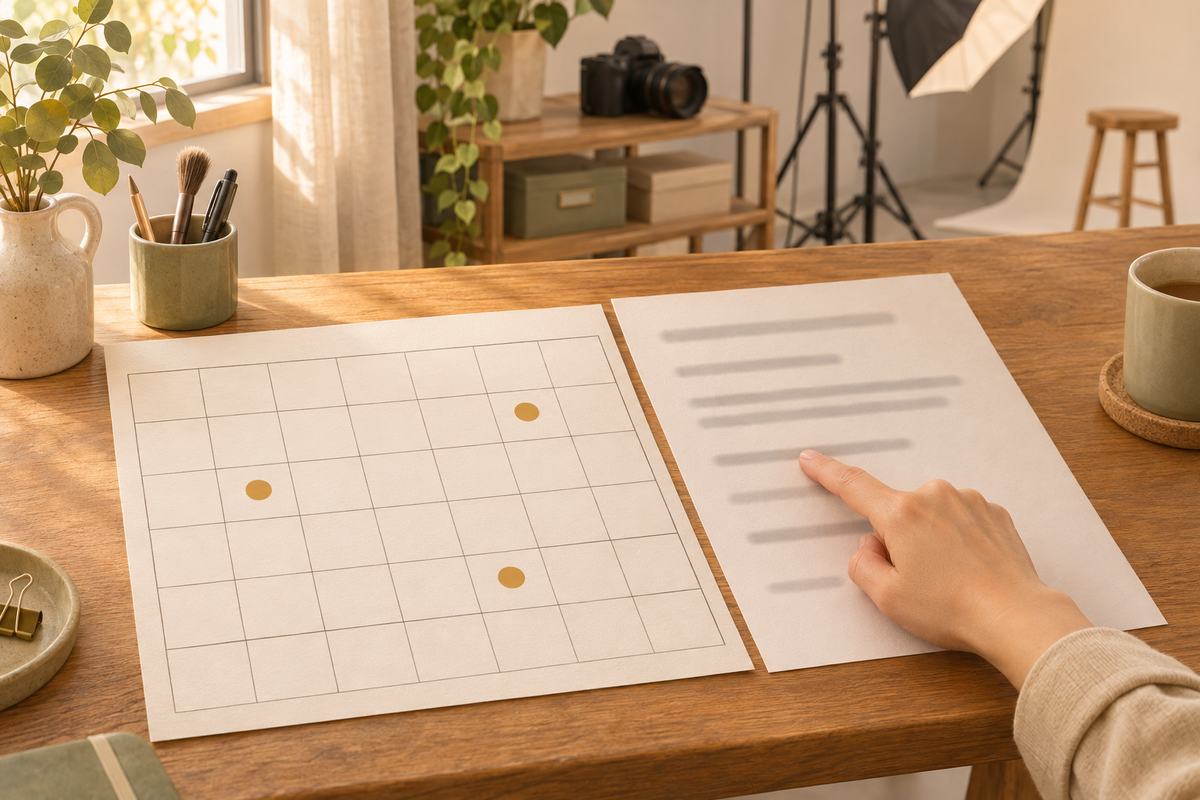
First we made Yunseo's info sheet of prices and rules. A profile shoot is 150,000 won per person including 5 edited photos, and each extra edit is 10,000 won. She does not do on-site shoots, and she is open Tuesday to Saturday, 10 a.m. to 6 p.m. We also added a rule: a booking can be changed once for free up to 3 days before the shoot, and after that the deposit is not refunded. Then we attached four open shooting slots in November.
We gave this material and one email at a time to a fresh AI assistant in a new conversation. Once, we only said "write a draft reply." The other time, we added a template in the order "confirm the request in one line, answer first, what the other person does next" plus two lines of rules. The rules were: do not promise discounts, dates, services or exceptions that are not in the info sheet, and mark them [needs confirmation]; and write out the basis for any date or amount separately. Three emails, two ways: six assistants wrote once each.
Email
Plain request
With template and rules
Declining an on-site shoot
Declined politely, but attached a one-person price list nobody asked for
Declined briefly, but wrote "a studio shoot is possible," making a 30-person shoot sound like a promise
Changing a booking date
Correctly said there are no evening slots. Stated flatly that changing after today means the deposit is not refunded
Used the same deadline, then a few lines later wrote that moving the deposit is [needs confirmation], so the reply contradicts itself
Originals and edits
Dates and amounts correct. Asked if the photos could come quickly, it decided "difficult" without asking whether rush service exists
Dates and amounts correct. Left rush service as [needs confirmation]
The good news first: all six drafts got the amounts and weekdays right. No assistant made up schedules or prices that are not in the list, such as evening slots or discounts. The problems came from somewhere else: the "promise sentences" the shop has to stand behind. We ran each email only once per method, so we cannot say one method is always better.
How much of a decline can you hand over?
The year-end party inquiry is one the studio has to decline. She does not do on-site shoots, and Saturday evening is outside business hours. Both assistants got these reasons right, and neither reply was rude. Smoothing the wording of a decline is something AI does quite well.
The catch was what they added. The plain-request assistant attached four lines of one-person profile prices to a company contact who had asked about a group shoot. We expected the template assistant to be more careful, but it wrote "however, a studio shoot is possible." Nothing in the info sheet says whether 30 people can be photographed in a one-person studio. It left only the price as [needs confirmation] and kept "possible" as it was. Even with rules, promises still slip through like this.
So in a decline, what a person decides is whether to really decline, and what to offer instead. If Yunseo writes just those two lines, the rest of the wording can be handed to AI.
What slipped into the rescheduling replies?
The date-change email was the trickiest. The customer wanted to move a Friday, November 20, 2 p.m. booking to a weekday after 7 p.m. the following week, and also asked to carry the deposit over. Both assistants correctly answered that after 7 p.m. is outside business hours. Neither invented evening slots that are not in the calendar.
The catch was "free change up to 3 days before." The day of the reply happened to be November 17, exactly 3 days before the shoot. Both assistants judged that "today is the last day for a free change," and the plain-request one told the customer outright: "if you change after today, the deposit will not be refunded." The arithmetic is right. But whether the third day itself counts, or whether to give this customer a day of slack, is Yunseo's call. Once it is written in a reply, it becomes the shop's promise.
The template assistant was stranger. It wrote "you need to confirm today for us to carry over your 50,000-won deposit," and then a few lines later, "whether the deposit can be moved: [needs confirmation]." One reply said both "yes" and "we need to check." A customer reading only the first sentence would believe it is a yes.
Why is an information email the easiest to hand over?
The third email only needed the existing rules explained. A customer who had a shoot on Friday, November 13, asked when the originals would arrive, how much 3 extra edits would cost, and whether the edited photos could come within the week.
Both assistants correctly answered that the originals would come by Wednesday, November 18, and that the extra edits cost 30,000 won. That meant counting business days while skipping Sunday and Monday closures, and they still got it right. When the rules are in a table, AI is good at pulling numbers out of it and turning them into sentences. That is why we suggest starting with information emails like this.
There is still a part for a person. Asked whether the photos could come quickly, the plain-request assistant answered that within the week would be difficult, and in its note to the owner it wrote "impossible." The info sheet simply had no rush-service rule, and it turned "not listed" into "not possible." The template assistant left rush service as [needs confirmation].
When giving an example of when the edits would be done, one said November 27 and the other the 26th. It split on whether the day the customer picked the photos counts as day 1 or counting starts the next day; both calculations are correct. It is the same kind of split as the delivery dates in our earlier post, 5 tasks a solo worker can cut with AI. One line in the info sheet about how to count would remove the difference.
How do you use the three reply templates?
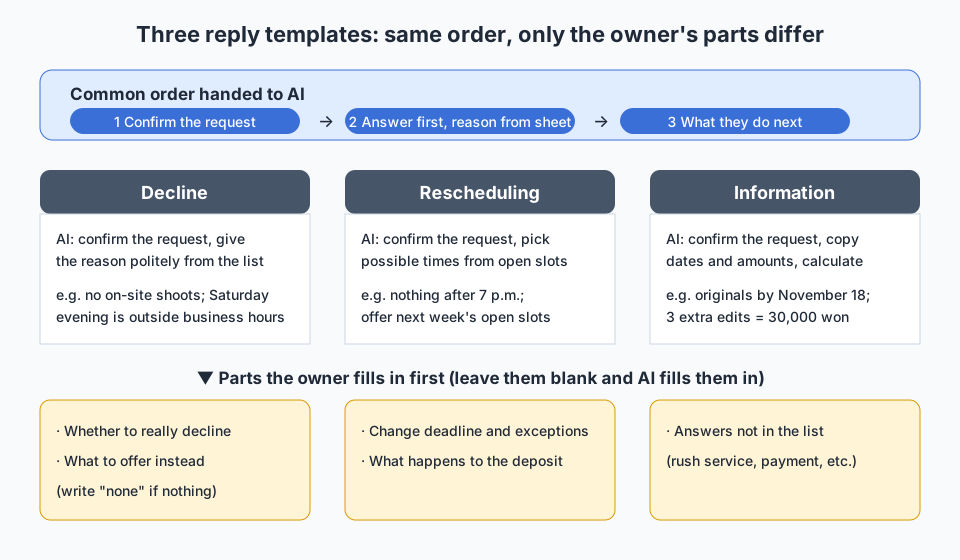
After the test, we set up one template for each kind of email. The order of parts is the same, "confirm the request, answer, next step," and only the parts a person fills in first differ.
Template
Parts to hand to AI
Parts the owner fills in first
Decline
One line confirming the request; the reason for declining, politely, based on the info sheet
Whether to really decline; what to offer instead (write "none" if nothing)
Rescheduling
Confirm the request; pick possible times from the open-slot calendar; say it is difficult if outside business hours
The change deadline and exceptions; what happens to the deposit
Information
Confirm the request; copy and calculate dates and amounts from the info sheet
Answers to questions not in the list (rush service, payment method, and so on)
The two lines of rules from the test were enough to attach to the template. Because the calculation basis came separately under the reply, checking the numbers was quick too. But as the decline showed, rules alone do not stop every promise. So we think it is better not to leave the right-hand column blank, and to write at least one line there before handing the email over. We have not rerun the test with that column filled in, so we do not yet know how much it helps.
What do you check before sending?
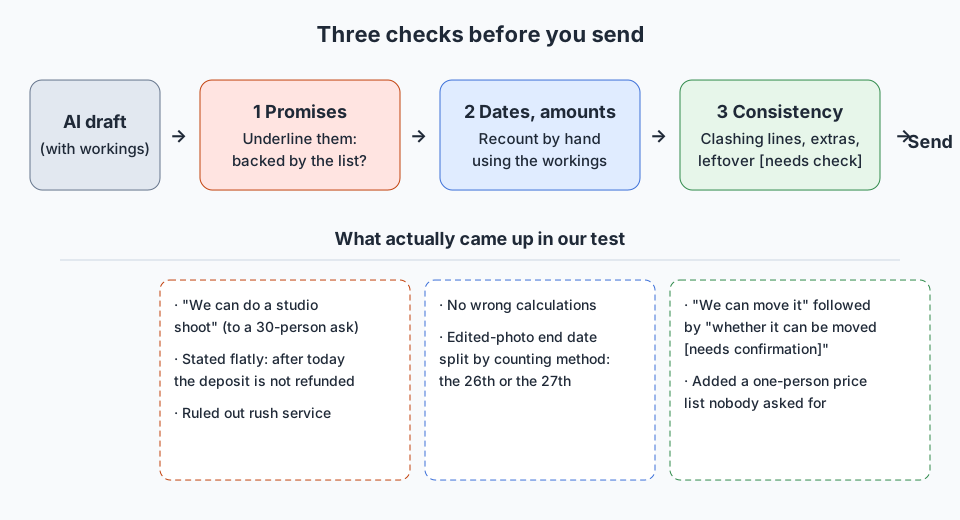
Collecting where the six drafts actually went wrong, there were three places to check.
Underline promise sentences: find the sentences the shop must stand behind, like "possible," "not possible," "by today" or "will not be refunded," and see whether the info sheet backs them. This was where our test caught the most.
Recount dates and amounts: count once more by hand, looking at the calculation basis. There were no wrong calculations this time, but when there are two ways of counting, like the 26th and the 27th, pick one and write it down.
Check it is consistent from start to end: make sure one reply does not say both "yes" and "needs confirmation," and that nothing unasked was added. This is also where you make sure no [needs confirmation] mark is left in when you send.
We did not time the checks. But the template drafts were under eight lines of body text, so we estimate they take less time than writing from scratch.
Our view
For repeat emails, what AI cuts is "the time spent composing sentences," and what it does not cut is "deciding the promises," in our view. In this test AI never got a calculation wrong, but in four of six drafts it decided a deadline or what is possible on its own and wrote it in. So when we build a reply template, we decide the parts a person fills in first before the parts we give to AI. If those parts are blank, AI fills them in instead.
Frequently asked questions
Q. Can I paste in emails that contain customer names or contact details?
The safer default is to remove names and contact details and replace them with "customer": a reply draft only needs the request and the info sheet. Also check the guidance of the service you use and any privacy rules that apply to you. Our test used only made-up emails, and we did not test with names removed.
Q. Do I really need a separate template for each kind of email?
The order of parts is the same for all three, so one template works. Only the parts a person fills in first change. Pick the email you get most often and fill in those parts first.
Q. If I have to check every time, does it really save time?
We did not time it. Instead of writing from scratch, you only look at promise sentences and numbers, so we think there is room to save time. If checking takes longer for a certain email, reconsider whether to hand it over at all with our 5-question checklist.
This site's principles on how we use AI are in How we use AI.
This post was written with the help of AI tools and reviewed by the site editor before publishing. How we use AI
Sources
Item
Source
Checked
The made-up photo studio info sheet, open-slot calendar, 3 emails, and the 6 AI assistants' reply drafts
Our own hands-on record (material we made up, no outside sources)