We ran this test in Korean, with Korean date formats and amounts in Korean won. This English edition is a translation: amounts stay in Korean won (KRW) as in the test, and we did not rerun the test in English.
What worries us when we hand a spreadsheet to AI?
Say, for example, you ask AI to tidy a week of orders for a small shop. The dates now share one format and the amounts look neat. At month end you add things up and the total does not match your books. If you saved over the original sheet, you have no way to find where it went wrong.
A table cleaned by AI still looks tidy when rows disappear or numbers change. So instead of reading the result and hoping, we decide the checks first and compare numbers.
What do we check before pasting anything in?
Work on a copy, not the original. Delete or replace anything that should not leave your hands, such as names, phone numbers and bank accounts. If the sheet belongs to your employer, check the rules for that tool first. And do not paste the whole thing at once. Start with about 20 rows. If something goes wrong, it is much easier to find out why.
How do we ask for one fix at a time?
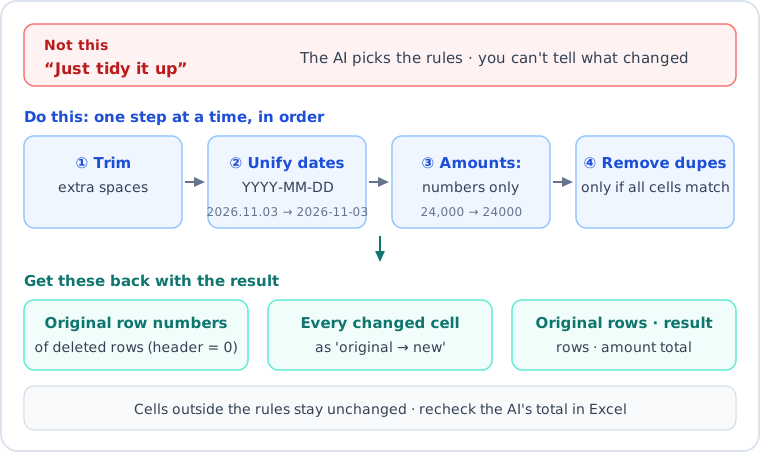
"Tidy it up" lets the AI choose its own rules, so you cannot tell what it changed. List the fixes one by one, in order, and ask it to write every changed cell as "original → new value". That list is what you will check later. You can copy the prompt below as it is.
Below is an order sheet (CSV). Clean it with these rules.
1. Do one step at a time, in this order: (1) trim spaces at the start and end; (2) make all dates YYYY-MM-DD (if a date has no year, assume 2026 and say you assumed it); (3) keep only the number in each amount; (4) remove duplicates. A row is a duplicate only if every cell is the same.
2. List every deleted row by its original row number (header row = 0).
3. List every changed cell as "original → new value". Do not change any cell the rules do not cover.
4. At the end, give the original row count, the result row count and the amount total.
[paste the table here]
How do we know the result is right?
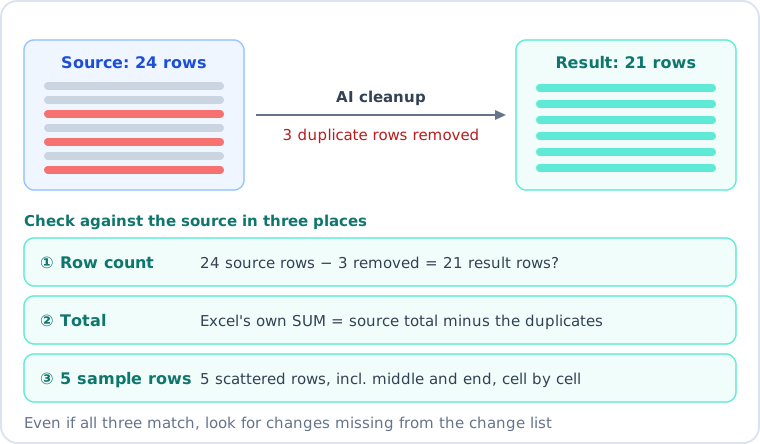
We use three checks. On a short table they probably don't take long, but we did not time them. First, the row count. The original row count minus the rows the AI says it deleted should equal the result row count. Second, the total. Add up the amount column with your spreadsheet's own sum function, and compare it with the original total minus the duplicate rows. Do not trust the total the AI writes in its answer. The value the spreadsheet calculates is safer. Third, a sample. Do not just skim from the top. Pick 5 rows scattered across the sheet, including the middle and the end, and compare each one with the same order in the original, cell by cell.
These three are a quick check. Even when the total matches, other cells such as dates or items may have changed, and rows outside the 5-row sample go unchecked. That is why you need the list of changed cells. If a cell changed and it is not on the list, the AI changed it on its own. But the AI made that list too, so it can miss cells. The list itself needs checking. To know that every cell is right, you need a full comparison of the original and the result, cell by cell. In the experiment below we did that full comparison with a small script, not in a spreadsheet. We did not run the same comparison by hand in a spreadsheet.
What happens when we try it?
We tried it on a made-up order sheet with 24 rows. Dates came in four shapes (2026-11-02, 2026.11.03, 11/4 for month/day, and November 4, 2026). Amounts looked like 24,000, 45,000 won and 12000. We put in two pairs of identical rows and one order that differed only by spaces and the word "won". We also mixed in rows that must not be deleted, such as the same person ordering a different item on the same day. We fixed the right answer in advance: delete 3 rows, keep 21, total 553,000 won.
We gave the sheet to two fresh AI assistants who did not know about the traps, once each, in a new conversation. One got only "tidy it up, remove duplicates and make dates the same format." The other got the prompt above.
The result was not what we expected. Both gave 21 rows and a total of 553,000 won, and the row order and date formats were right. The rows that must stay were still there, and both caught the duplicate that differed only by spaces. Both also said they had assumed 2026 for 11/4 and 11/7, which had no year. Our comparison found every row and cell matching the answer we had fixed in advance from the original.
What we checked
Simple request
Prompt with rules
Rows and total
21 rows, 553,000 won (correct)
21 rows, 553,000 won (correct)
Deleted rows
3 deleted, described by content
Listed the 3 original row numbers
Changed cells
Summarized the kinds of changes
About 30 cells as "original → new value"
The difference was not right versus wrong. It was whether a clue was left to find a mistake if there had been one. The assistant given the rules said it added the total by hand. As that note implies, the AI's total is an unchecked number, so we checked it ourselves. The list was long, so looking at all of it is a chore, and in practice you end up checking a few entries. This was a short table, each prompt was run once, and we put in the traps ourselves. It does not mean the next run will also be right.
What does "formulas from AI, math from the spreadsheet" mean?
For totals and averages, do not ask AI for the number. Ask it for a formula to put in a spreadsheet cell. The spreadsheet does the calculation, so the result is the same every time. We did not run any formulas in a spreadsheet for this post, so check a formula you receive against a value you worked out by hand on a small table first.
What do we think?
You cannot tell by eye whether a table is clean. We think it is better to decide on the row count, total, 5 sample rows and a list of changed cells first than to hunt for the perfect prompt.
FAQ
Q. Can I upload a spreadsheet file to AI as it is?
Formats and rules differ by tool. We only tried pasting the table in as text. We did not try file uploads. Delete or replace columns with personal data in the copy you paste in, and check any rules at your workplace first.
Q. What if the table is very long?
We only tried 24 rows, so we cannot say. If you split it into pieces, check the row count and total for each piece separately.
Q. What if the AI ignores my rules and changes things?
It did not happen this time, but with one run each we cannot say it never will. Put "do not change cells the rules do not cover" and the changed-cell list in your prompt. If you see a change that is not on the list, do not use that result.
This post was written with the help of AI tools and reviewed by the site editor before publishing. How we use AI
Sources
Content
Source
Checked
The made-up order sheet and the two cleanup results
Our own hands-on record (an order sheet we made up, no outside sources)