Say the secretary of a small club gives meeting notes to an AI and gets back clean minutes. A week later someone asks, "By the way, who is getting the event photos, and by when?" and no matter how many times the secretary searches the minutes, there is no answer. The writing is smooth, but the thing you needed is missing.
So before looking at length or wording, we first check whether four columns are filled in: decisions, to-dos, owners, and deadlines. When decisions are missing, the same topic comes up again at the next meeting. When to-dos are missing, nobody does them. When owners are missing, you hear "I didn't know that was mine," and when deadlines are missing, the work keeps getting pushed back. The three steps below help you check that these four are not missing.
Step 1How do you hand over the notes?
Hand them over raw, exactly as they are. If you tidy them first, the history of how something changed and vague phrases like "on hold for now" disappear, and then neither you nor the AI can check what happened. Put only the meeting date and the attendees' names at the top, then paste the notes in the order they were said, typos and all. If the notes mix in something that shouldn't leave your organization, such as customer information, first check whether it's OK to put it into that tool.
Step 2How do you ask for a table?
If you only say "summarize it," the result shrinks into readable prose, and owners and deadlines tend to melt into the sentences. So decide the columns in advance and ask for tables. You can copy the prompt below as it is.
Below are meeting notes. Please organize them using these rules.
1. Use two tables. Table 1 "Decisions" (decision / supporting text from the notes). Table 2 "To-dos" (to-do / owner / deadline / supporting text from the notes).
2. If the notes give no owner or deadline, do not make one up. Write "Needs confirmation."
3. Wording that is not final, such as "maybe," "about," or "for now," does not go into decisions. Put it in an "Undecided" list below the tables.
4. If something changed during the meeting, write the final outcome and add one line about how it changed.
5. Never add anything that is not in the notes.
[Paste notes here]
Rule 2 tells the AI not to invent missing owners or deadlines, and rule 3 tells it not to promote vague remarks to decisions. Don't drop the "supporting text from the notes" column. You will use it when you cross-check later.
Step 3How do you find what's missing?
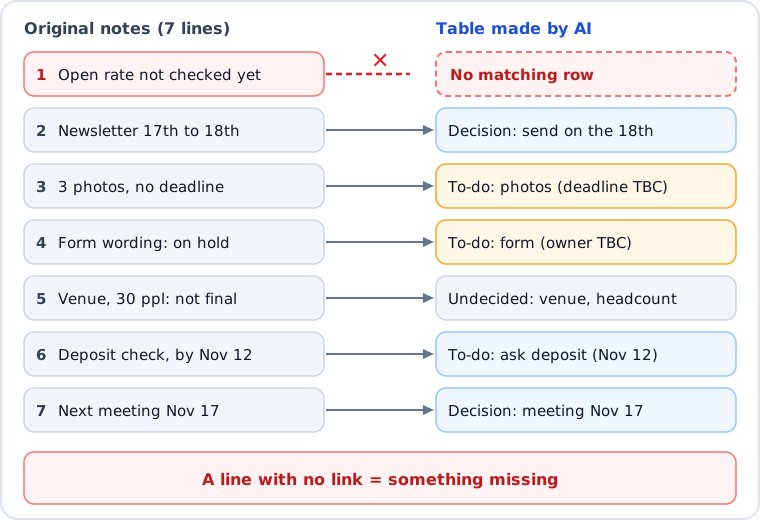
Don't ask whether you like the summary. Instead, go through the original notes one line at a time and look for each line somewhere in the tables. A line that isn't in the tables is what's missing. This is far more reliable than reading. Check with the table below.
What to check
How to check it
Pass
Every line of the notes
For each line, find it in the tables (or in "Undecided") and tick it
0 lines missing
Owners and deadlines
Look for names or dates in the tables that aren't in the notes
None
Where things changed
Whether the final outcome is what's written
Correct
Non-final remarks
Whether they're in "Undecided" and not mixed into decisions
Correct
Numbers and dates
Whether they match the notes character for character
Same
What happens when you actually try it?
We tried it with weekly meeting notes for a made-up small club. We put in places where an AI could easily get confused on purpose: a date that changes, a to-do with no deadline, and an item put on hold with no owner.
Meeting notes 2026-11-10 / Present: Alex, Blair, Casey, Drew
- Alex: haven't looked yet at what share of people opened the last newsletter
- Blair: let's send the next issue on the 17th. No, Casey is out on the 17th, so make it the 18th. -> decided on the 18th
- Casey: will collect 3 photos for the newsletter. Didn't say by when
- Alex: someone has to fix the wording on the sign-up form, but who? Hold for now
- Blair: probably should go with the second Saturday of December for the venue. Maybe 30 people? Not final
- Drew: will find out the venue deposit. By November 12
- Casey: next meeting is November 17, same time
The notes, prompts, and results below are English translations of our Korean-language test, and the fictional names have been adapted for this edition. We gave the notes to two new AI assistants separately, neither of which knew about the traps. We told one only, "Put the decisions and to-dos in a table, with owner and deadline columns." We gave the other the prompt above. Each ran once in a new chat.
Both handled the date change, the non-final remarks about the venue and headcount, and the held item reasonably well. The visible difference was in the first line, Alex's "haven't looked yet at the open rate."
Line in the notes
Simple request
With the prompt
Newsletter 17th -> 18th
Correctly wrote the 18th
The 18th, plus how it changed
Venue and 30 people
Correctly sorted as "not decided"
Sorted into "Undecided"
Sign-up form wording
Owner "undecided (on hold)"
Owner and deadline "Needs confirmation"
Open rate, "haven't looked yet"
Created a new to-do, "Check open rate," and listed Alex as the owner
Nowhere in the tables (missing)
With the simple request, a to-do that wasn't in the notes appeared. A task, "Check open rate," was attached to Alex. Luckily, the AI added on its own that "there was no statement that Alex would check." The version with the prompt got rid of that invented task, but as a side effect the whole line disappeared. We only learned this by doing the line-by-line check in Step 3, and if we had just read them, both sets of tables looked clean enough that we would have missed it. Each was run only once, so we can't say that either one is always better, and we also knew in advance where the tricky spots in the notes were.
Looking back, this gap was not only about checking. It also came from the columns in the prompt. "Haven't looked yet at the open rate" is a status update, not a decision, a to-do, or an undecided item, so it had no column to go in. If your notes have many status or background lines like this, you could add a "Notes" column, but we have not tested that version.
What we think
It is hard to tell by reading whether a summary came out well. So we think it is better to decide in advance where you will look for what's missing than to learn how to ask for a better summary. Going through the notes line by line and finding where each line ended up in the tables (not just comparing line counts, since a line can be dropped while another is added) probably takes only a few minutes (an estimate; we did not time it), and it is more reliable than skimming.
FAQ
Q. Can I use this for text converted from a recording?
Yes. Text converted from audio is just like notes. But conversion can introduce wrong characters, so check names and numbers against the original once more. In this post we did not try any tool that converts recordings to text.
Q. What if the notes are long?
We only tried it with seven lines. We haven't tried long notes, so we can't say. If you split them up, do the line check on each piece.
Q. Is it OK to put meeting content into an AI?
Rules differ by company and group. If the meeting involves customer information or internal material, check the rules first on whether you may put it into the tool you want to use. If you're unsure, we suggest practicing with names and numbers masked.
Q. Can't the AI decide owners and deadlines?
If an AI sets something the meeting never decided, it isn't a result of the meeting. Take its suggestion if you like, but leave it in the table as "Needs confirmation" and let a person decide.
This post was written with the help of AI tools and reviewed by the site editor before publishing. How we use AI
Sources
Item
Source
Checked
The fictional meeting notes and the results of the two runs
Our own hands-on record (notes we made up, no outside material)