Picture a made-up one-person design studio called Hourglass Design. On Monday morning, the owner opens the inbox. Last week's meeting notes are still unsorted, a month of receipts has piled up, and three emails are waiting about confirming a client's schedule. "I could just hand this to an AI," they think, but where to start is unclear. This post offers a checklist for that moment. The scoring rules are ones we made up, and this is general guidance, not legal, tax, or investment advice.
The first step is to write a list of tasks. One line each, stating "what goes in and what comes out." A broad entry like "manage email" can't be scored. Break it down to something like "draft a reply to the client's schedule-confirmation email," and now you can score it.
What are the five questions?
For each task on the list, ask these five.
No.
Question
Example benchmark
Q1
Do you do it often, or does it take a long time?
4 or more times a month, or 30 minutes or more each time
Q2
Is the output format decided in advance?
You can describe the table columns or the structure of the email
Q3
If it's wrong, is it easy to notice and fix?
One quick scan shows what looks off
Q4
Can you check the result against an original or a standard?
There are notes, a schedule, or a total to compare with
Q5
Is it OK to put this information into an AI?
No names, contact details, bank accounts, passwords, or contract terms, or you can remove them first
The "4 times, 30 minutes" in Q1 has no evidence behind it. It is a value we set so that we could score.
We didn't start with this version either. Q4 used to be "Is there someone to check it?" But a person working alone always ends up checking, so all ten tasks came out "yes." It couldn't tell tasks apart, so it was useless, and we changed it to "Can you check it against an original?" Q2 had the same problem. When we looked at the input as well, notes vary so much that scoring became inconsistent, so we decided to look only at the output format.
How do you read the score?
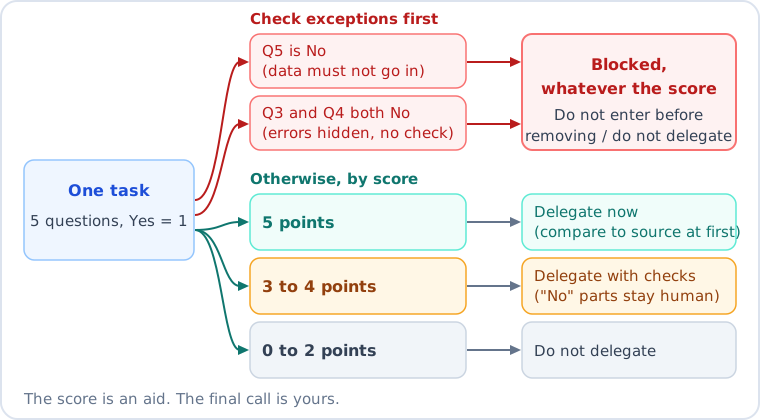
"Yes" is 1 point and "no" is 0. Add them up. With 5 points, hand it over right away, though for the first few runs you compare the result with the original. With 3 or 4 points, hand it over with checks, and a person takes any part that got a "no." With 0 to 2 points, don't hand it over.
Two exceptions come before the score. If Q5 is "no," you don't put the information in until you've removed the sensitive parts, however high the score. If Q3 and Q4 are both "no," you don't hand the task over. A task where mistakes go unnoticed and there is no way to check is risky at any score.
The score is only a tool to support your judgment, and the final decision belongs to the person handing over the work. So how does it come out when you apply it to the fictional tasks below?
What happens when you score 10 fictional office tasks?
We scored the 10 tasks that Hourglass Design does, one cell at a time. The counts and times are all assumptions we made up. O means yes and X means no.
#
Task
Q1
Q2
Q3
Q4
Q5
Score
Verdict
1
Turn meeting notes into a decisions and to-dos table
O
O
O
O
O
5
Hand over now
2
Draft a reply confirming a client's schedule
O
O
O
O
O
5
Hand over now
3
Move receipt details into a monthly table
O
O
X
O
O
4
With checks
4
Turn weekly to-dos into a priority list
O
X
O
O
O
4
With checks
5
Write 3 options for a social media post
O
X
O
X
O
3
With checks
6
Draft a price-increase notice (first time)
X
X
O
O
O
3
With checks
7
Remove duplicates from a customer contact list
O
O
X
O
X
3
On hold
8
Decide which of 3 quotes to go with
X
X
X
X
O
1
Don't hand over
9
Apology email for a late delivery
X
X
O
X
O
2
Don't hand over
10
Judge whether a contract clause is unfavorable
X
X
X
X
X
0
Don't hand over
A few things showed up while scoring that we would not have noticed from the table alone.
Task 3, receipts, looks fine at 4 points, but Q3 is "no." A single wrong digit won't show up on a quick scan. So checking the total against the receipts stays with a person. Task 7, the contact list, got 3 points but was put on hold because of Q5. You would need to change the task so that names and numbers are removed and the AI is only asked how to remove duplicates. The most surprising one was Task 6, the price-increase notice. It isn't a repeating task, yet it scored 3. That means you shouldn't filter tasks by repetition alone.
Still, this scoring is only our judgment from looking at the table. We did not actually give the 10 tasks to an AI, and we did not measure any change in completion time. Next, let's look at why low-scoring tasks shouldn't be handed over.
What shouldn't you hand over?
The typical case is writing that carries a judgment: an apology, a promise, or a refusal. In Task 9, the apology email, you can tell by reading whether the tone sounds awkward, but an AI can't know whether the promise in it is one you can make. Task 9 in the table scores the whole job, including what to promise and whether to send. Drafting the text alone would be scored again as a separate task, and either way a person decides whether to send it.
The same goes for contract, tax, health, and investment decisions. When, as in Task 10, there is no standard to check the result against, asking an expert is safer. For tasks where contact details, bank accounts, or passwords would go in as they are, remove or mask them before you put anything in.
A task with a decision mixed in, like Task 8, can be split to find a way forward. The person decides, and only the job of copying the quote items into a table is scored separately.
What we think
We think the mark of someone who uses AI well is closer to knowing what not to hand over than knowing what to hand over. So we put more weight on reading the cells marked "no" than on raising the score. The cell with a "no" is exactly the part a person has to take.
FAQ
Q. What if the score is borderline?
Split the task into smaller pieces and score it again. If it still lands around 3 points, try it once and check the result yourself.
Q. What if I tried it and it took longer?
There can be several causes, and we have not tested which is most likely. One is that Q4 should have been a "no." Without a standard to check against, checking takes time. Score that task again, and time it once both ways, doing it yourself and handing it over and checking, then compare.
Q. If it's 5 points, can I skip checking?
No. For the first few runs, compare the result with the original, and cut back once you feel you can trust it.
Q. What information shouldn't I put in?
It depends on the service, so read the guidance for the one you use. For example, Google's Gemini guidance says to enter only information you'd be comfortable with a reviewer seeing (see the Sources table). If you're not sure, mark Q5 as "no."
How this site uses AI is explained in How we use AI.
This post was written with the help of AI tools and reviewed by the site editor before publishing. How we use AI
Sources
Item
Source
Checked
Google Gemini guidance: enter only information you're comfortable with reviewers seeing; the model may state wrong content as fact